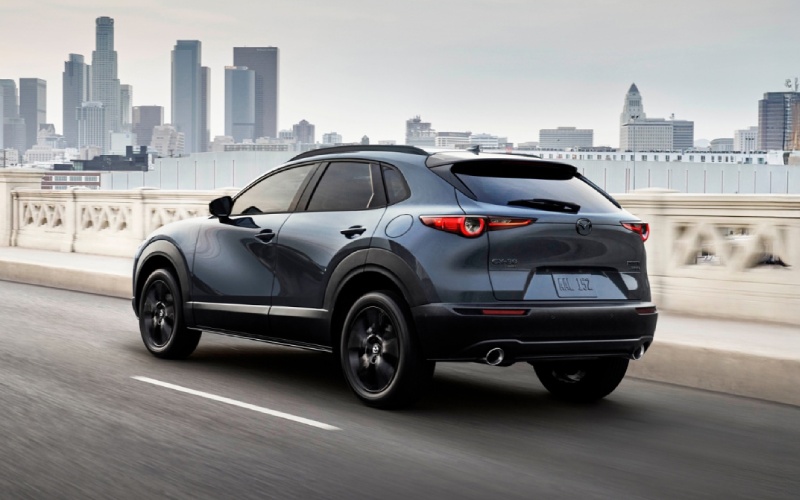
Tustin Mazda - Can I remote start a 2026 Mazda CX-30 with the MyMazda App around Orange, CA?
If you are considering a 2026 Mazda CX-30 and wondering whether you can warm up or cool down the cabin from your phone, the answer is built right into how this compact SUV is designed to fit real life. Through Mazda Connected Services and the MyMazda App, the 2026 Mazda CX-30 supports remote engine start so you can prep the interior before you ever open the door—useful whether you are heading to class at Chapman University, meeting friends near the Plaza in Old Towne Orange, or rolling out early for a weekend at the coast.
At Tustin Mazda, we get hands-on with this technology every day, and we can show you exactly how remote start works on the CX-30, how to set it up, and when it is most helpful for daily driving around Orange, CA, and greater Orange County.
Why remote start matters for Orange, CA driving
Between hop-on, hop-off errands across Orange and longer freeway stints on SR-55 or the 22, remote start is more than a convenience—it is a comfort multiplier. Preconditioning the cabin helps you arrive feeling composed rather than flustered, and it pairs neatly with the CX-30’s driver-focused layout and refined ride.
Here are a few everyday scenarios where remote start on the 2026 Mazda CX-30 makes life smoother around town:
- School pickups: Pre-cool the cabin before you pull into a tight curb zone, so kids hop into a comfortable back seat without waiting.
- Gym-to-grocery transitions: Start the engine and cabin climate from your phone while you check out, then load chilled items into a cooler interior.
- Event nights near the Plaza: Queue up remote start as you walk back from dinner so the CX-30 is ready to roll when you reach your spot.
- Weekend beach runs: After a sandy day, pre-set airflow to help dry swimsuits and air out gear on the drive home.
- Early commutes: Prep the cabin before you leave the driveway, then slip into a seat that already feels just right for the morning drive.
How remote start works on the 2026 Mazda CX-30
The 2026 Mazda CX-30 connects your vehicle and phone through Mazda Connected Services. Using the MyMazda App, you can remotely start the engine and check status reports—complimentary for one year—so you can confirm your commands were received and see that the vehicle is ready before you head out. Once the engine is started remotely, the CX-30 can begin bringing the interior toward your last-used climate settings for a more comfortable cabin when you arrive.
Because the CX-30 emphasizes intuitive control, the process feels natural: open the MyMazda App, authenticate, and tap to start. You can verify that the command was successful from the app’s confirmation screen and then head to your vehicle at your own pace.
Step-by-step: set up MyMazda on your CX-30
Getting up and running takes just a few minutes. Here is a quick overview so you know what to expect when you visit us for a test drive or delivery walkthrough:
- Download MyMazda: Install the MyMazda App on your compatible smartphone.
- Create or sign in: Use your existing MyMazda credentials or create a new account.
- Add your CX-30: Enter your Vehicle Identification Number (VIN) to pair the vehicle to your account.
- Activate Connected Services: Follow the on-screen prompts to enable Mazda Connected Services for the CX-30.
- Enable remote start: In the app, locate the remote engine start control and complete any one-time confirmations.
- Customize preferences: Review notification settings so you receive confirmations and helpful status updates.
The MyMazda App uses cellular data to communicate with your CX-30. As with any connected feature, functionality may depend on coverage and the vehicle’s configuration, so our team will confirm details on your exact vehicle during your visit.
Tech that complements remote start on CX-30
Remote start is one part of a broader, cohesive technology experience in the 2026 Mazda CX-30. Once you are on the move, available Alexa Built-in lets you adjust select functions with your voice so you can keep your eyes on the road. Apple CarPlay® and Android Auto™ integration make it simple to bring your world along, and the available Bose® 12-speaker premium audio system with Centerpoint® and AudioPilot® elevates whatever you are listening to as you glide through Orange.
Confidence comes standard, too. i-Activsense® safety features support awareness around town and on the freeway, and the 2026 Mazda CX-30 is among the Mazda vehicles recognized with a 2025 IIHS TOP SAFETY PICK+ award—as of August 2025—so you can drive with added peace of mind. And because agile control matters on our varied OC roads, the CX-30 offers effortless composure with responsive handling and stability, supported by standard i-Activ AWD® on 2026 models for enhanced traction when the pavement is slick.
Feature availability can vary by trim and timing. At Tustin Mazda, we will walk you through which CX-30 configuration best matches how you drive—whether you value the simplicity of Apple CarPlay® and Android Auto™ integration, the extra immersion of Bose® audio, or the voice control of available Alexa Built-in alongside the convenience of remote start.
Test-drive and setup help at Tustin Mazda
We are happy to demonstrate remote engine start in person and help you set up the MyMazda App before you leave our store. Visit us at 28A Auto Center Dr in Tustin—just a quick hop from Orange—to experience how the 2026 Mazda CX-30’s connected features, refined interior, and confident dynamics come together for daily life in Orange County. If you prefer, our team can also guide you over the phone to complete setup at home so your CX-30 is ready for the week ahead.
Frequently Asked Questions:
Is remote engine start supported on every 2026 Mazda CX-30?
Remote engine start is supported through Mazda Connected Services and the MyMazda App on the 2026 Mazda CX-30 when the service is activated and the app is properly set up. Specific feature availability can vary by configuration and market. Our team will confirm support for the exact vehicle you choose.
Will the climate system adjust automatically when I use remote start?
When you remote start, the CX-30 can begin bringing the cabin toward the last-used climate settings. For best results, set your preferred temperature and airflow before you turn the vehicle off at the end of your previous drive.
How far away can I be when I remote start the CX-30?
The MyMazda App communicates with your CX-30 over a cellular connection rather than short-range radio, so range is not limited to a key fob distance. As with any connected feature, performance depends on network coverage and the vehicle’s connection.
What happens after the first year of Mazda Connected Services?
Mazda Connected Services, which includes remote engine start and status reports through the MyMazda App, is complimentary for one year. After the initial term, plan options may be available. Details and terms can change, so we will review the latest information with you at Tustin Mazda.
If you are ready to see how the 2026 Mazda CX-30 fits your routine in and around Orange, we invite you to stop by for a test drive. We will pair your phone, activate Mazda Connected Services, and walk you through remote start so you leave fully set up and confident in your new CX-30.